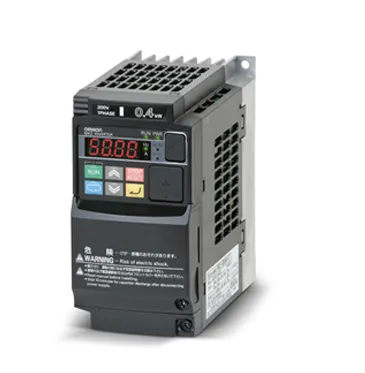
CNC760 connected to a VFD
Exercise caution when configuring the spindle on your machine; powerful spindles are extremely dangerous and can cause injury or death if mishandled. Ensure that you keep your fingers clear of the spindle, the area around the spindle is clear, and no tool is installed unless explicitly instructed otherwise. Disconnect the machine from mains power as always when making changes to the wiring of the machine, as mains voltages are deadly. Even a VFD that was recently connected to power may still have a charge, consult the manual of the VFD to ensure safe conditions when touching the connection points.
To connect a spindle to the controller, it is important to determine the type of connection needed. In general, all spindles and VFD combinations fall into one of the following categories. Some may be able to be configured to function in multiple ways.
Regardless of connection type, the spindle must be connected safely. Ensure that the connections follow local regulations for safety, this may include a safety relay to cut power to the device in emergency conditions. Be sure that you can turn the device off in an instant, especially during setup.
Types of VFD control
Most VFDs will have two signals for controlling it:
- Control the speed
- Switch the VFD on/off
For controlling the speed, we use 0-10V. 0 volt being the lowest RPM, and 10V the highest RPM. Please note that 0 volts does not always correspond to 0 RPM; this can be configured in our software, as some spindles have a minimum speed. It's also important to understand that controlling a VFD solely with 0-10V is unsage idea since any signals appearing on these wires could activate the spindle.
So in both cases this will be the same. However, for switching the drive on and off, there are two types of control of a VFD:
Type 1: Tool On/Direction Type 2: Clockwise (CW)/ Counter-clockwise (CCW)
Both types are supported, but please check your manual and/or set up your drive accordingly.
VFD/Spindle Type 1: Tool on/ Direction
This VFD type uses one signal to turn the spindle on and another to control its direction. the CNC760 has a dedicated output for tool-on and a dedicated tool direction output.
Tool on output | Tool direction output | Spindle behavior |
|---|---|---|
Off | Off | Off |
Off | On | Off |
On | Off | Turning clockwise* |
On | On | Turning counter-clockwise* |
*The direction may need to be set up in the configuration parameters for the VFD, consult the VFD’s manual for this. Verify that the direction is correct before using the machine.
Before connecting the VFD to the CNC760, program the configuration parameters of the VFD to match the spindle. Find the parameters that allow external control of the spindle through the inputs on the VFD, and the speed control voltage reference is set to 10V or the control type is set to PWM.
Both outputs on the CNC760 can be inverted, but keep in mind that it is recommended to wire the VFD in a way that the spindle is off when both outputs are off. Doing this will ensure the spindle turns off if the controller breaks or malfunctions.
Wiring
Speed control can be done using either 0-10V or PWM. The CNC760 is capable of supplying either option. The most common is 0-10V, where 0V corresponds to the minimum RPM and 10V to the maximum RPM. When choosing PWM, you may need a pull-up resistor to achieve the upper voltage expected by the VFD. The CNC760 contains user-selectable pull-up resistors to simplify wiring. The usage of 0-10V voids the PWM1 output.
In the manual for the VFD, find the connections for Tool On and Direction, in most cases, there is a connection overview diagram. The diagram in the manual will look very similar to the ones below.
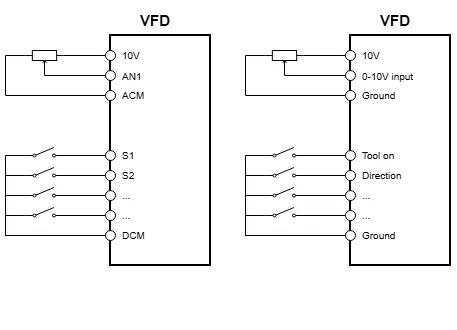
Using a relay.
The connection between the inputs and the DCM signal does not indicate whether DMC is a 24V or ground signal. It's therefore advisable to use a small relay to connect the DCM signal and the inputs.
Note, the relay should have an anti-parallel diode to ensure any spikes coming from switching the relay will not arrive at the outputs of the CNC760
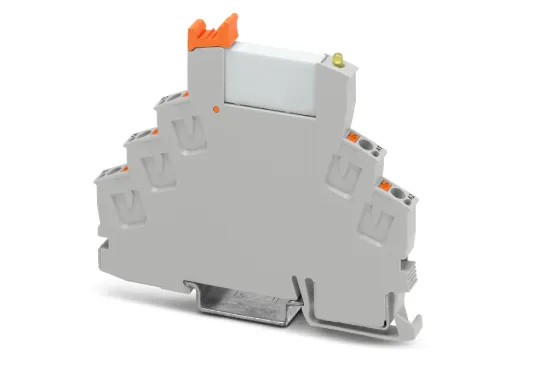
The relay that is used does not need to be very powerful, since almost no current will flow. An option is to use a DIN rail-mounted relay.
Below is an example of such a relay. In this case, it is a Phoenix Contact RIF-0-RPT-24DC/21 (SKU: 2903370).
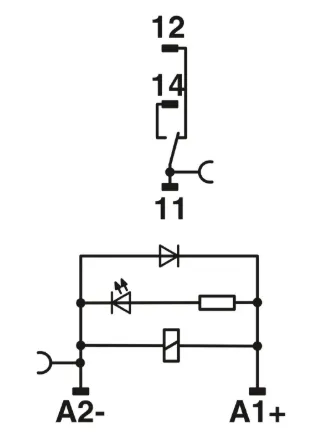
In the picture above, you can see what's inside on the right. Besides the relay, you also see the diode, and, as a bonus, an LED indicator that helps you check your wiring.
The outputs on the CNC760 are so-called 'Open collector outputs.
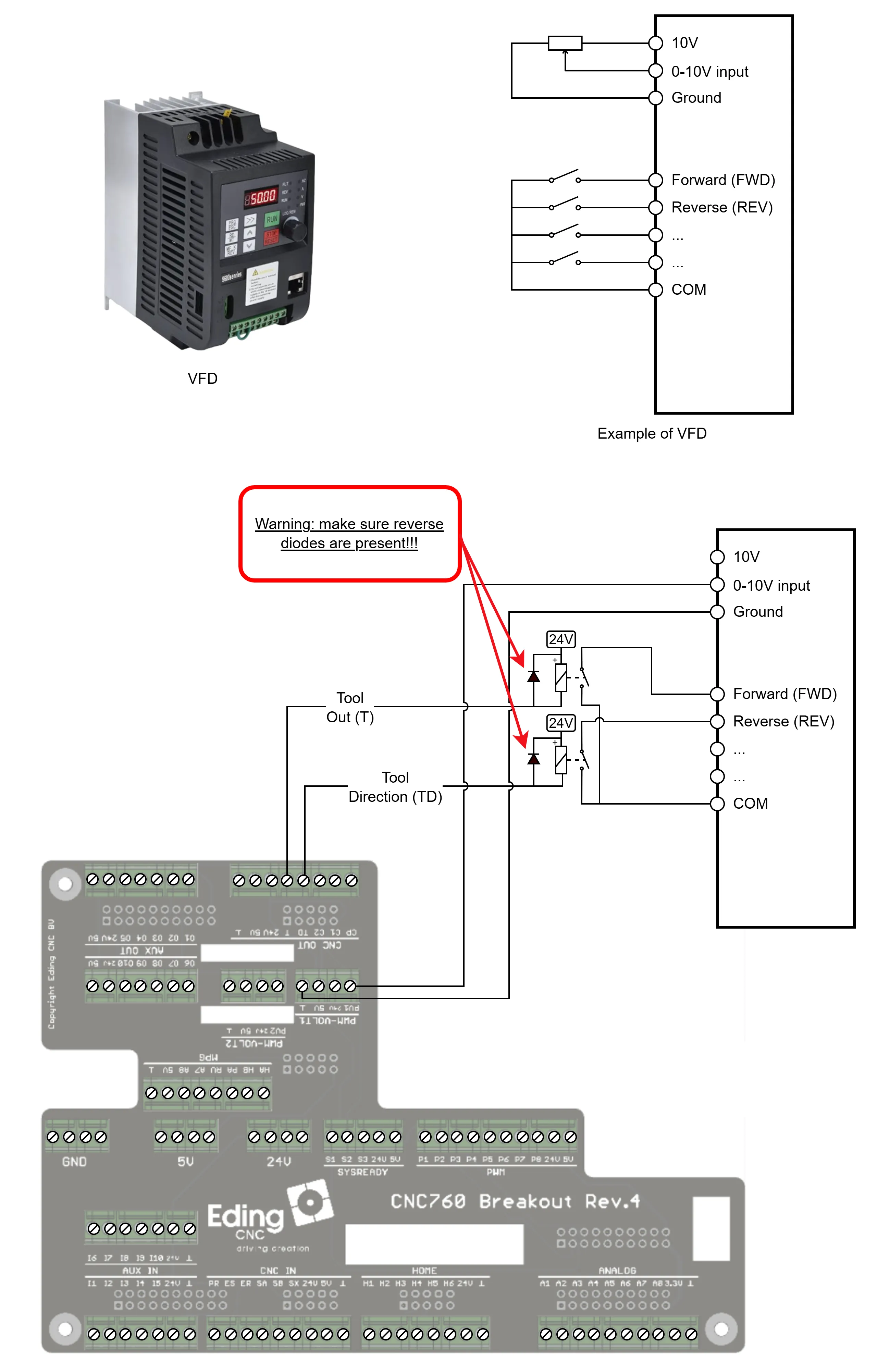
VFD/Spindle Type 2: Clockwise (CW) / Counter-clockwise (CCW)
This VFD type connects to the controller using a connection for clockwise rotation (CW) and one for counter-clockwise rotation (CCW). The markings on your EdingCNC controller are named tool on and tool direction in case tool direction is not available, an aux output must be used. The Tool On output is used as for the CW signal and the Tool Dir is used as CC
Off | Off | Off |
|---|---|---|
Off | On | Turning counter-clockwise |
On | Off | Turning clockwise |
On | On | Undefined* |
*Consult the manual of your VFD to see the behavior of the spindle when both inputs are active. This is unintended and undefined behavior and will be avoided by the CNC760.